
Daily attendance
Track first-in, last-out, working minutes, late arrivals and attendance status.
Flowwkkr is designed to connect attendance punches with employee records, shift schedules and daily workforce reporting.
Explore the product area in more detail and see how it fits into the wider Flowwkkr HR workspace.
Track first-in, last-out, working minutes, late arrivals and attendance status.
Review attendance history and workforce patterns across a selected period.
Keep attendance aligned with employee shift start, shift end and grace minutes.
Support overnight schedules where an employee shift crosses midnight.
Keep synchronized punches available for attendance review and auditing.
Use KPIs, attendance flags, status summaries and working-time information.
Attendance is the input that drives payroll, overtime and workforce cost. When it is wrong, salaries are wrong, disputes start, and month-end closes takes days instead of minutes. Flowwkkr turns biometric punches and manual entries into a single, reconciled daily and monthly attendance record per employee.
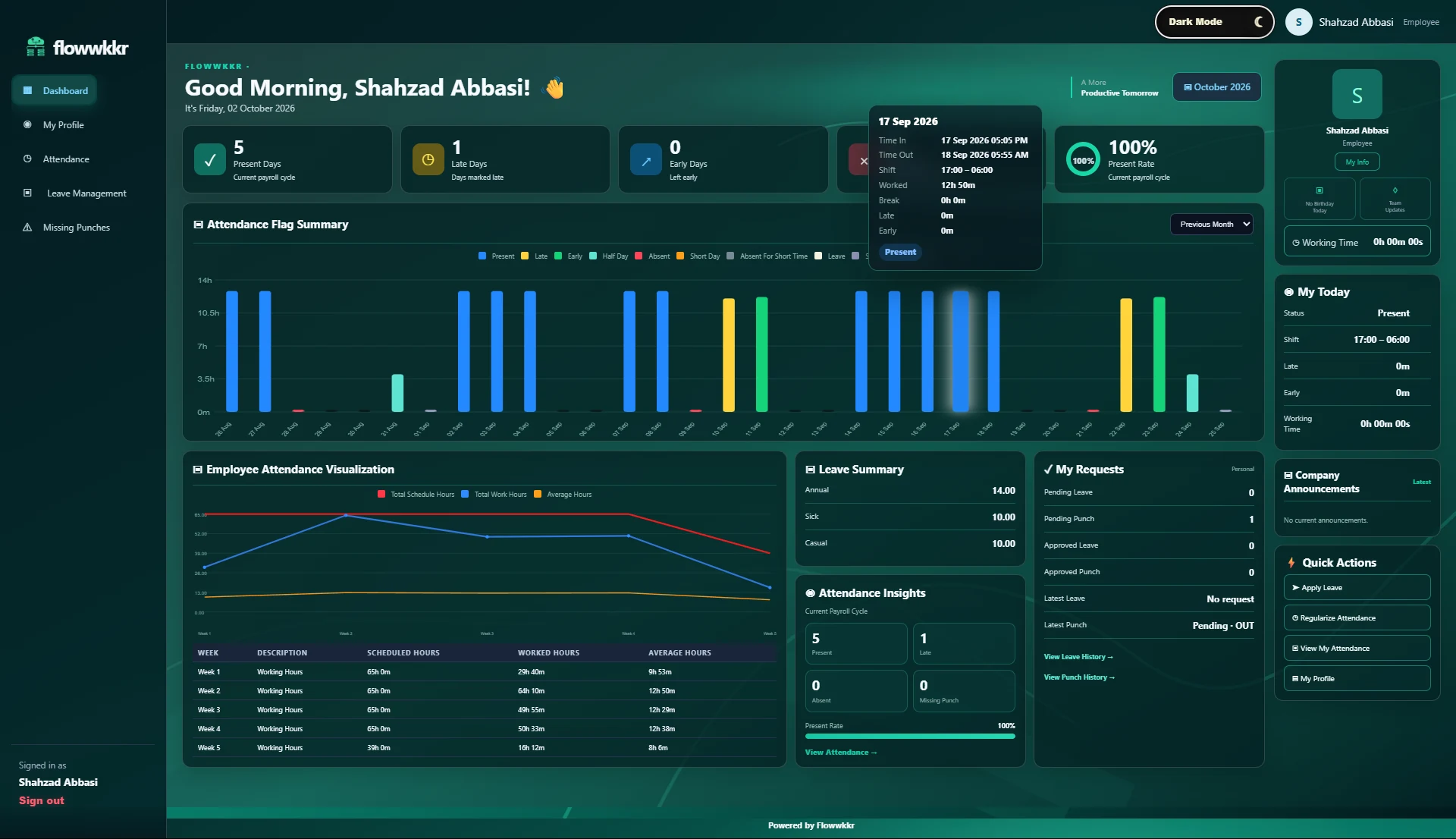
Flowwkkr receives raw punches from your attendance device, stores each one, then calculates a clean daily summary for every employee. A punch is matched against the employee shift, the grace period, approved leave and public holidays to produce a first-in, last-out and status for the day.
The calculation is shift-aware, including overnight and night shifts where a shift starting at 22:00 ends the following morning. This is where most attendance tools break: they treat every shift as a calendar day and mark night-shift staff absent even when their punches exist.
An overnight shift is one working day, not two calendar days. A supervisor working 22:00 to 06:00 has not clocked in twice, and should not be reported as a late arrival followed by an absence. Treating those punches as separate days is the single most common reason Pakistani manufacturers dispute their attendance data.
Flowwkkr calculates against the shift that was rostered, not the calendar date. The rostered shift owns the attendance record for its entire window.
| Situation | Naive calendar-day logic | Flowwkkr shift logic |
|---|---|---|
| Rostered 22:00-06:00, punched 21:55 and 06:10 | Late on day 1, absent on day 2 | One present day, 8h 15m working time |
| Approved leave on a rostered working day | Counted as absent | Deducted as sanctioned leave |
| Punch at 00:30 during a night shift | New day, no check-in | Check-out against the running shift |
| One punch only, no return | Half-day by guesswork | Missing-punch request raised for approval |
Every punch carries an external key. If the same punch arrives twice — common when a device retries a sync or an agent resends a batch — Flowwkkr recognises the duplicate and counts it once. You get accurate counts instead of inflated hours.
This matters more than it sounds. Inflated working time flows straight into overtime and payroll, and it is discovered by employees, not by software, which makes it expensive to correct after the fact.
Flowwkkr produces the reports an HR team actually runs, not a generic report builder:
Attendance is only useful if something downstream consumes it. Flowwkkr stores the calculated attendance as structured data rather than a rendered report, so payroll reads working days, overtime and leave days directly. Nobody retypes a number from a printed sheet.
A missing punch is not the same problem as an absence, and treating it as one is what generates disputes. Someone who forgot to clock out is not someone who did not work, and the record should say which of the two happened.
Flowwkkr raises a missing-punch request against the specific date and punch type, routes it to an authorised approver, and recalculates the day once it is approved. The correction is recorded as an adjustment rather than applied silently, so the original punch stays visible.
| Situation | Without a correction workflow | With Flowwkkr |
|---|---|---|
| Forgotten clock-out | Half-day or full absence, contested at payroll | Missing-punch request, approved, day recalculated |
| Approved correction | Someone edits the register directly, untraceable | Approval recorded with who approved and when |
| Repeated absence by one person | Indistinguishable from a data error | Missing-punch requests counted separately |
| Audit question | Reconstruct from memory and paperwork | Trace to the raw punch plus the approval |
An attendance sheet becomes a problem when it is questioned. The qualities that make it hold up are unglamorous: consistent definitions applied every month, adjustments visible rather than hidden, and a rule for edge cases agreed before anyone has to apply it.
Most disputes are not about the data being wrong. They are about a rule that was never written down and was applied differently each month by whoever prepared the sheet.
Yes. Flowwkkr treats a shift that starts late at night and ends the following morning as one shift, not two calendar days. Attendance for overnight staff is calculated against the rostered shift, so night-shift employees are not incorrectly marked absent or late.
Approved leave requests are deducted during the attendance calculation, so an employee on sanctioned leave is not marked absent. This is a core difference from tools that calculate attendance independently of the leave module.
Yes. An employee or manager raises a missing-punch request with the date, punch type and reason, and an authorised approver approves it. The daily record is then recalculated, and the correction is recorded rather than silently applied.
The device keeps recording punches locally. When the connection returns, the agent relays the stored punches and Flowwkkr counts each one once. There is no data loss and no double counting.
Yes. Manual entries are supported alongside device punches for staff who are not on a biometric device, and both feed the same calculation so there is one attendance record per employee.
Bring your device model, shift pattern and employee count. We will confirm fit on a private 2-hour demo.
Request a private 2-hour live demo and explore the HR workflow.