
Employee records
Keep names, departments, designations, contact details, employment information and profiles organized.
Flowwkkr brings employee management, attendance, leave, approvals, reports and employee self-service into one HR workspace.
Explore the product area in more detail and see how it fits into the wider Flowwkkr HR workspace.
Keep names, departments, designations, contact details, employment information and profiles organized.
View daily and monthly attendance, raw punches, working time, late arrivals and absences.
Handle employee leave requests, approvals and leave summaries in one workflow.
Use controlled access for Super Admin, HR Admin, Owner, managers and employees.
Let employees view attendance, update profiles and manage their own requests.
Use attendance flags, workforce KPIs, leave summaries and working-time information.
HR operations usually fragment across spreadsheets, a separate biometric system and a payroll workbook nobody fully trusts. Flowwkkr brings employee records, attendance, leave, approvals and reporting into one workspace, so the same employee data drives every report.
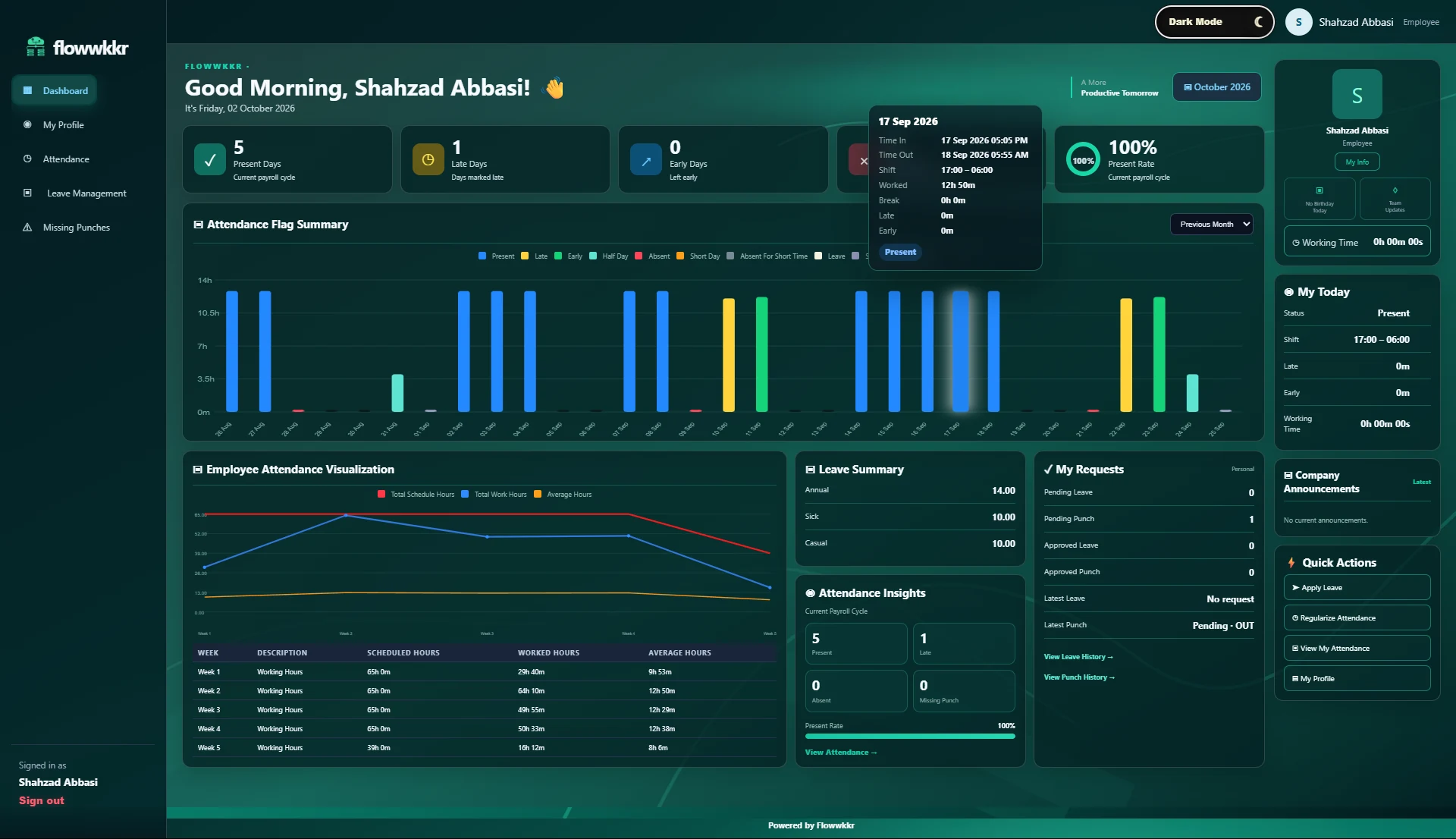
Instead of five tools that disagree with each other, Flowwkkr runs these against a single employee record:
A spreadsheet is fine as a temporary view and unreliable as a system of record, because it has no single source of truth. The same employee exists in the attendance sheet, the leave sheet and the payroll sheet, each with slightly different details, and the discrepancies are only found when someone queries them.
The usual outcome is a month-end reconciliation ritual: HR retypes figures from one sheet into another, and every retyping is an opportunity for error. The fix is not a better spreadsheet. It is one record that other processes read from.
| Operation | Spreadsheet approach | Flowwkkr |
|---|---|---|
| An employee changes designation | Edit the HR sheet, then the payroll sheet, then the attendance sheet | Edit once; every module reflects it |
| Leave approved | Someone remembers to mark the attendance sheet | Leave deducts from attendance automatically |
| Headcount for a department | Re-count rows, exclude two people on leave | Live count, with on-leave staff shown separately |
| Audit question: why was this absent? | Reconstruct from four sheets | Trace to the raw punch and the approval |
Employees see and update their own details, request leave, and view their own attendance, without messaging HR for routine changes. Managers approve leave and review team status in one place, and every action is recorded.
This is where most of the low-value HR workload actually goes. Removing it frees HR time for the cases that genuinely need judgement.
Access follows the employee record, not the person. A department manager sees their own team, HR sees the whole workspace, an employee sees only their own records.
Scoped access is not just a security control. It is what makes manager self-service usable: a manager who can see every department salary cannot be given self-service tools at all.
| Role | Can see | Can change |
|---|---|---|
| Employee | Own record, own attendance, own leave balance | Own contact details, own requests |
| Department manager | Own team attendance and leave | Team approvals, team records |
| HR administrator | Full workspace employee data | Employee records, leave types, shifts |
| Owner | Full workspace, including licence and module control | Everything, including entitlements |
Flowwkkr is designed for teams roughly in the 30 to 100+ employee range, and for shift-based operations including overnight and night work. If you are replacing spreadsheets and a standalone biometric box, Flowwkkr is sized for you.
It is deliberately not aimed at enterprises with 5,000 staff and a dedicated IT department, and it is not a general-purpose accounting package. It does one thing properly: keeping employee data, attendance and leave consistent.
The honest part of any HR software conversation is that most of the work is on your data, not the software. A system is live when your employee records are trustworthy, and getting there is a data exercise that nobody can shortcut.
| Stage | Realistic duration | What takes the time |
|---|---|---|
| Employee data preparation | 1-3 weeks | Cleaning a spreadsheet that has drifted over years |
| Department and reporting lines | Several days | Agreeing who reports to whom, which is rarely written down |
| Leave types and holiday calendar | 1-2 days | Deciding accrual rules and carry-forward policy |
| Device mapping and enrolment | 1-2 weeks | Bulk mapping User IDs, re-enrolling poor templates |
| Parallel run | 1 week | Comparing live output against the manual process |
| Go-live | Day 1 | Nothing, if the parallel run was taken seriously |
Before evaluating any product, find out how good your current data actually is. Export it and look for the things that break a migration: duplicate employees from a merger or an acquisition, people who left months ago still marked active, and job titles that differ between two spreadsheets.
If your source data is poor, no software will produce good results. Every vendor will tell you their system is fine, and they will be right, while your reports stay wrong because the input was wrong.
Flowwkkr is priced by employee capacity, with plans for 30, 50 and 100+ employee teams. Device and sync-agent counts are included per plan. Visit the pricing page for current plans.
No. Flowwkkr works with supported existing ZKTeco devices through a licensed agent. You keep your hardware and the device keeps working on its own.
Yes. Flowwkkr uses role-based access, so an employee sees only their own records while managers, HR and owners see progressively wider views. Managers are scoped to their own team.
Yes. Employee records and historical data can be imported. Bring a sample export and we will confirm the fit and the cleaning required during onboarding.
Yes. The employee-facing experience is built for mobile, so staff can view their attendance, request leave and check their balances from a phone.
Bring your device model, shift pattern and employee count. We will confirm fit on a private 2-hour demo.
Request a private 2-hour live demo and explore the HR workflow.