
Workforce KPIs
See total employees, present today, late arrivals and absences in the dashboard.
Flowwkkr combines workforce KPIs, attendance status, leave activity, working time and role-based workflows for everyday HR decisions.
Explore the product area in more detail and see how it fits into the wider Flowwkkr HR workspace.
See total employees, present today, late arrivals and absences in the dashboard.
Use status summaries to understand present, late, absent, leave and other attendance states.
Review employee working minutes and shift-based calculations.
Connect approved leave activity with workforce reporting.
Support controlled views for owners, department managers and managers.
Give employees visibility into their own attendance, leave and profile information.
Day-to-day HR decisions need a current view of the workforce: who is in, who is late, who is on leave, and where the overtime is going. Flowwkkr turns attendance and leave data into a live operational picture rather than a month-end reconstruction.
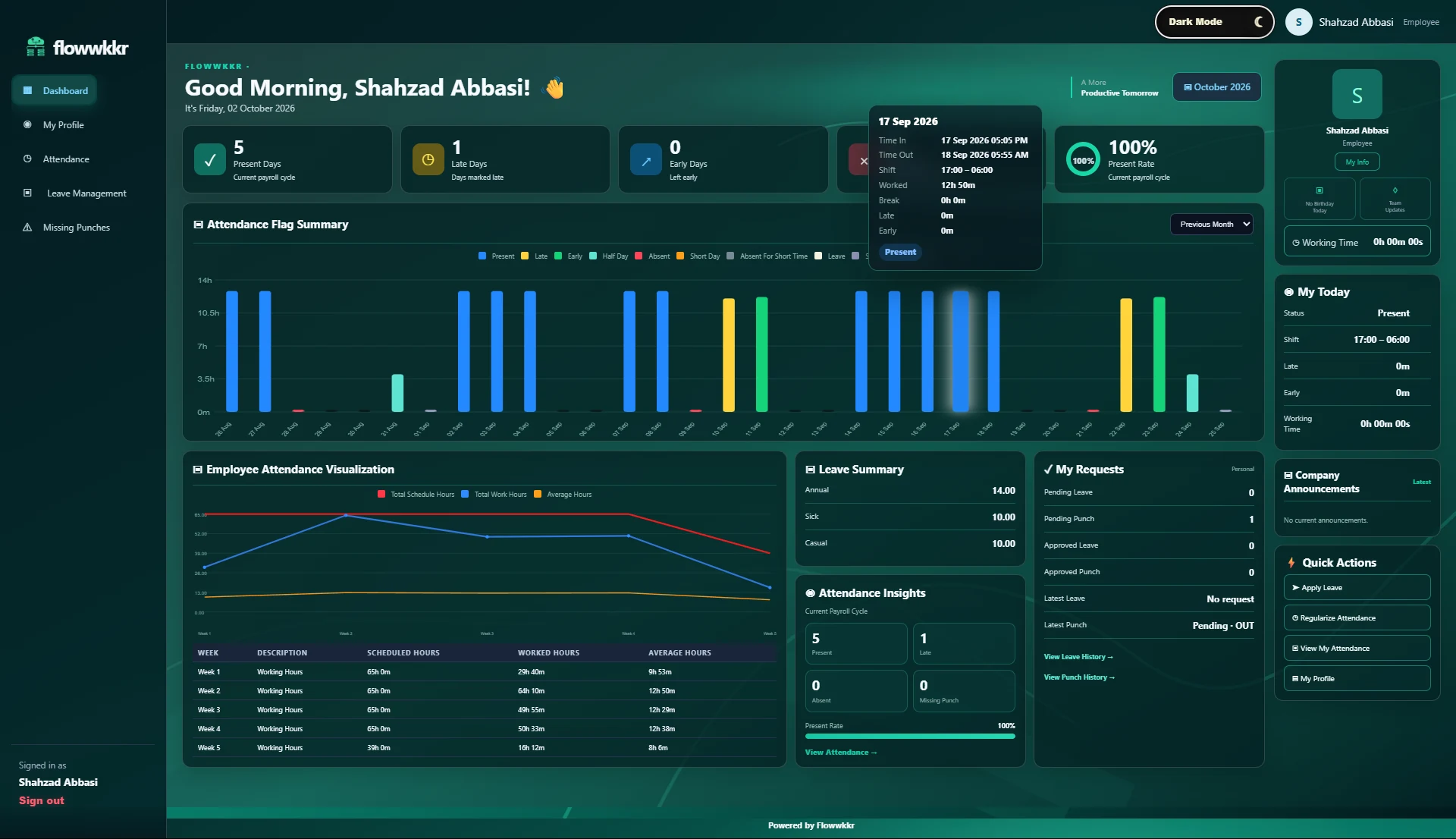
Dashboards show current attendance, late arrivals, absences and leave at a glance, updated from your device as punches arrive, rather than rebuilt at month end when it is no longer actionable.
Not every metric on a dashboard deserves attention. These four are the ones that reliably predict a payroll or staffing problem before it becomes expensive.
| Signal | What a rising trend means | Action |
|---|---|---|
| Repeat late arrivals by employee | Rostering problem, not a discipline problem | Review the shift start, not the employee |
| Overtime concentrated in one department | Understaffing, or an attendance double-count | Check staffing before authorising overtime |
| Attendance rate dropping | Morale, transport or shift-pattern change | Investigate before assuming |
| Missing-punch requests rising | Device or mapping problem | Check enrolment quality and IDs |
Each day carries a status per employee — present, late, on leave, absent, half-day, or off. Flagging days rather than leaving them blank makes it obvious when a record is simply missing, which is a very different problem from an absence.
Reports run from live attendance and leave data rather than a manually maintained workbook, so they do not silently go stale. Daily, monthly and working-time analysis can be exported for management and finance.
One late arrival is noise. A pattern is information. The distinction matters because a manager who reacts to individual days spends their time on the wrong people and misses the real issue.
The patterns worth watching weekly are the ones with a plausible operational cause. Late arrivals clustered on one shift usually mean the shift start is wrong, not the workforce. Overtime concentrated in one department usually means understaffing. Rising missing-punch requests usually mean an enrolment or device problem.
| What you see | The likely cause | The wrong response |
|---|---|---|
| Same people late repeatedly | Shift start set before they can realistically arrive | Disciplinary action against individuals |
| Overtime up in one department | Understaffed, or a shift pattern that always overruns | Capping overtime without fixing the roster |
| Attendance rate falling site-wide | Transport, shift change, or seasonal effect | Assuming a morale problem and acting on it |
| Missing-punch requests rising | Poor enrolment quality or a device problem | Approving the requests indefinitely |
| Absence concentrated on one weekday | A scheduling or staffing pattern nobody planned | Treating each case separately |
Most staffing problems are visible in attendance data weeks before they are felt. If a department is consistently running below required cover, that shows up as overtime and as a rising absence rate, both of which are visible in the data before anyone complains.
The useful output is therefore not a report but a trigger. Workforce data earns its cost when it tells you that a roster needs changing next month, which is different from telling you what happened last month.
A dashboard nobody acts on is decoration, and the usual cause is that it shows too much. If every metric is on screen, nothing is a signal, and the person looking at it has to work out what matters, which is the job the dashboard was meant to do.
Start from the decisions rather than the data. Decide which questions you need answered weekly, and only surface the numbers that answer them.
The exception report earns its place first. A summary tells you what happened; the exception list tells you what to look at, which is the version that saves time.
Yes. Reports run from live attendance and leave data rather than a manually maintained workbook, so they do not drift out of date between the day they are produced and the day they are read.
Yes. Visibility is scoped by role, so a manager sees their own team while HR and owners see the full workspace.
As punches arrive from your device, subject to your sync cycle. You do not have to rebuild or refresh a manually maintained report.
Yes. Overtime can be summarised by employee, department or period, which is usually the level at which an overtime problem is actually fixable.
Bring your device model, shift pattern and employee count. We will confirm fit on a private 2-hour demo.
Request a private 2-hour live demo and explore the HR workflow.